Mastering Rose SVG, DXF, Png, and Laser Cut Files for Flawless Crafts
Creating stunning floral designs requires more than just a good eye for aesthetics; it demands the right digital assets. Whether you are running a small business selling custom apparel or crafting personalized gifts for friends, the quality of your source files dictates the quality of your final product. A Rose SVG, DXF, Png, Laser Cut File bundle is often marketed as an all-in-one solution, but many creators stumble because they do not understand the distinct purpose of each format. Using the wrong file type for your specific machine or project can lead to wasted materials, frustrated customers, and hours of unnecessary troubleshooting.
Understanding the nuances between vector and raster graphics is the first step toward professional results. Many beginners assume that because a file looks identical on their screen, it will perform identically in production. This is a critical misunderstanding. Vector files like SVG and DXF rely on mathematical paths, allowing them to be scaled infinitely without losing quality. Raster files like PNG are made of pixels and have a fixed resolution. When you approach your next project with this foundational knowledge, you avoid the common pitfall of blurry edges or jagged cuts that plague amateur work.
The Trap of Ignoring File Compatibility
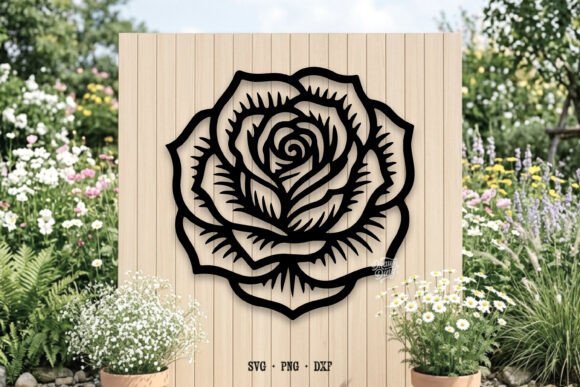
One of the most frequent errors crafters make is attempting to use a PNG file for cutting purposes. While a PNG with a transparent background is excellent for sublimation printing or digital mockups, it lacks the cut lines required by machines like the Cricut or Silhouette. If you load a PNG into Cricut Design Space expecting the software to automatically generate perfect cut paths around a complex rose design, you will likely end up with a messy silhouette that misses delicate petals and thorns.
To avoid this, always verify which edition of software you are using. For instance, the SVG file included in your download is perfect for Cricut users and those with Silhouette Cameo Designer Edition. These programs read vector data natively, ensuring that every curve of the rose is preserved. However, if you are using Silhouette Basic Edition, which does not support SVG imports, you must rely on the DXF file. Overlooking this compatibility check leads to immediate workflow stoppages. Always match the file extension to your software’s capabilities before you begin designing.
Overlooking Layer Separation and Weedability
Another common oversight involves the complexity of the design itself. A beautiful, intricate rose illustration might look magnificent on a computer screen, but it can be a nightmare to weed if converted into vinyl without proper layer separation. Many free or low-quality downloads provide a single solid shape rather than separated layers for different colors or materials. This forces the creator to manually separate elements, a time-consuming process that increases the risk of error.
When evaluating a Laser Cut File or vinyl-ready SVG, check if the design has been optimized for physical production. Are the thin stems connected securely to the main body of the flower? If not, these pieces may fall out during weeding or fail to adhere properly to the transfer tape. A high-quality file will account for these structural needs. Before committing to a large batch of orders, test cut a single unit. This simple step reveals whether the design holds together physically, saving you from the embarrassment of delivering fragile products to clients.
Misunderstanding Resolution Requirements for Sublimation
While vector files dominate the cutting world, raster files rule the printing domain. The PNG file included in your bundle is specifically designed with a transparent background, making it ideal for sublimation printing on mugs, t-shirts, and tote bags. A frequent mistake here is resizing the image beyond its original dimensions. Unlike vectors, PNGs become pixelated when enlarged. If you stretch a 300 DPI image to fit a large blanket, the result will be grainy and unprofessional.
To ensure crisp, vibrant prints, always check the pixel dimensions of your PNG before placing it in your design software. If your project requires a larger size than the provided file allows, you need to return to the vector source (the SVG) and export a new high-resolution PNG at the correct size. This workflow ensures that your sublimation projects maintain their clarity and color fidelity, regardless of the substrate size. Never assume a small web-optimized PNG is suitable for large-format printing.
Neglecting Software-Specific Settings
Even with the perfect file, incorrect software settings can ruin a project. Users of Sure Cuts A Lot, Make The Cut, or Silhouette Studio often forget to adjust blade depth, pressure, and speed according to the material they are using. A rose design with fine details requires precise settings. If the pressure is too high, the blade may drag through the backing paper, ruining the mat. If it is too low, the intricate petals may not cut through completely.
Take the time to consult your machine’s manual for recommended settings based on your specific material—whether it is heat transfer vinyl, cardstock, or adhesive vinyl. Perform a test cut using a small section of the rose design. This practice helps you dial in the perfect settings before committing to your final material. It is a small investment of time that prevents costly waste and ensures consistent quality across all your creations.
What to Check Before You Download and Use
Before you integrate any new asset into your workflow, perform a quick audit. First, confirm the license terms. Even if a file is free for personal use, commercial use may require an additional purchase. Respecting intellectual property protects your business from legal issues. Second, inspect the file structure. Open the SVG in your design software and ungroup the elements. Can you easily change colors? Are the layers logical? Third, verify the DXF compatibility if you are a Silhouette Basic user. Ensure the nodes are clean and there are no stray points that could confuse the cutting path.
Your download includes a versatile set of tools:
- 1 File - SVG: Perfect for Cricut and Silhouette Cameo Designer Edition, offering scalable vector precision.
- 2 File - PNG: Features a transparent background, great for sublimation printing and digital overlays.
- 1 File - DXF: Specifically formatted for Silhouette Basic Edition users who cannot import SVGs.
Refining Your Creative Process
Success in digital crafting is not just about having access to files; it is about knowing how to use them effectively. Avoid the rush to produce. Take a moment to plan your project, select the appropriate file type, and configure your software correctly. When you treat your digital assets with respect and attention to detail, the results speak for themselves. Clean cuts, vibrant prints, and satisfied customers are the direct outcome of informed decision-making.
Remember, technology is only as good as the operator. By avoiding common pitfalls like format mismatch, resolution neglect, and setting errors, you elevate your craft from hobbyist to professional. Keep experimenting, keep learning, and let these high-quality rose designs inspire your next masterpiece. With the right knowledge and tools, there is no limit to what you can create.